Colorful Doodle Arrows: A Versatile Asset for Visual Communication
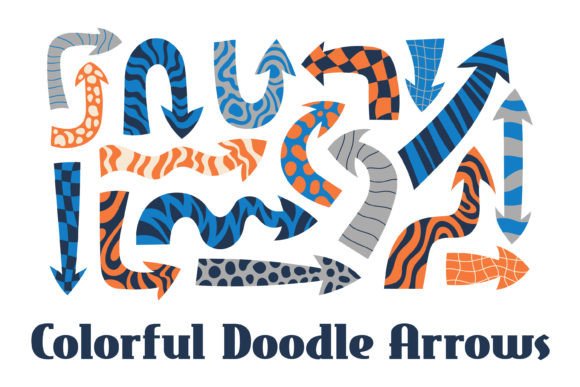
In the contemporary landscape of digital creation, where clarity and engagement are paramount, visual assets serve as critical components for directing attention, explaining processes, and adding stylistic flair. The Colorful Doodle Arrows collection—a set of 17 hand-drawn dynamic arrows decorated with grids, checkerboards, and wavy textures—is designed precisely for this role. This isn’t merely a set of icons; it’s a flexible toolkit for anyone needing to inject motion, direction, and a trendy, approachable aesthetic into their communications. Its utility spans from the initial brainstorming phase of a project to the final polish of a published infographic.
Understanding the Asset and Its Place in the Workflow
At its core, the Colorful Doodle Arrows pack is a vector illustration template delivered in multiple formats: 17 individual PNG elements, 17 JPG square cards with white backgrounds, and a consolidated EPS file containing all shapes. The high resolution of 4167 x 4167 pixels at 300 DPI ensures that these elements are ready for both digital screens and print-adjacent projects like presentation slides or poster elements. The hand-drawn, doodle style immediately sets it apart from sterile, corporate clip-art, offering a sense of creativity and informal energy that resonates in modern marketing, education, and personal projects.
This asset fits into a broader workflow as a visual shorthand. Before a project begins, these arrows can be used in mood boards or wireframes to denote flow and interaction. During a project, they become active components in slides, social media graphics, or instructional materials. After a project’s completion, they might be repurposed in case study graphics or summary reports. Their integration is less about a single, linear step and more about being a reusable resource that enhances visual communication at multiple touchpoints.
Primary Use Cases and Integration Points
The applications for these dynamic arrows are diverse, reflecting the varied needs of the target audience—professionals, creators, educators, and small business owners.
- Social Media & Marketing: Each PNG arrow can act as a standalone accent in posts, directing followers’ eyes to a call-to-action, a key product feature, or a step in a tutorial. The JPG cards with clean white backgrounds are particularly suited for quick insertion into carousel posts or story updates without additional editing.
- Presentations & Pitch Decks: Here, the EPS vector file is invaluable. Imported into presentation software like PowerPoint or Keynote, the arrows can be resized, recolored (if the software allows vector editing), and arranged to illustrate process flows, growth trajectories, or conceptual relationships without losing quality.
- Infographics & Reports: The wavy textures and grid decorations on the arrows add visual interest that breaks the monotony of data-heavy layouts. They can guide the reader’s path through the information, logically connecting statistics, quotes, or timeline points.
- Educational Materials & Blog Graphics: For educators and bloggers, these arrows make abstract concepts like “progress,” “iteration,” or “connection” concrete. They can highlight key takeaways in an article or denote the steps in a learning activity within a worksheet or online course module.
Practical Implementation and Workflow Integration
To leverage Colorful Doodle Arrows effectively, consider your existing toolkit and habits. The provided formats offer flexibility for different software competencies.
- Assessment & Preparation: Start by reviewing the ZIP contents. Organize the PNG and JPG files into a dedicated folder on your cloud drive or local system, named clearly (e.g., “Doodle Arrows Assets”). This simple step prevents future searches and maintains efficiency.
- Software Compatibility: The EPS file is compatible with professional vector software like Adobe Illustrator, Affinity Designer, and Inkscape, as well as many presentation tools. If you primarily use Canva or simpler graphic platforms, the PNGs will be your go-to. Understanding which format matches your primary platform avoids frustration.
- Consistency and Style Matching: While the arrows are colorful and varied, using them consistently within a single project strengthens visual cohesion. You might choose arrows with a common texture—like the checkerboard patterns—for all “decision points” in a flowchart, and the wavy-texture arrows for all “creative inputs.” This creates a subtle, internal visual language.
- Iterative Use in Creative Processes: During a design sprint or content creation cycle, place these arrows early in mockups. They can act as placeholder elements that later become refined components. Their informal style encourages a less rigid approach during brainstorming phases.
Interaction with Other Resources and Methods
Colorful Doodle Arrows do not exist in isolation; they interact with and enhance other elements in your workflow.
- With Typography and Color Palettes: The arrows’ colors and patterns should be considered alongside your project’s font choices and color scheme. They can either complement a palette or provide a purposeful contrast to draw attention.
- Within Team Collaboration: When shared with team members via the organized asset folder, these arrows become a shared visual resource, ensuring that multiple contributors (e.g., a marketer and a designer) maintain stylistic alignment across different outputs.
- Against Static Backgrounds: The JPG cards with white backgrounds are specifically designed for quick use on simple layouts. When placed on textured or photographic backgrounds, consider using the PNGs with transparent backgrounds for a more integrated look.
Factors for Long-Term Utility and Quality Control
The value of a graphic asset like this extends beyond a single project. Its long-term use hinges on organization, adaptability, and quality.
Organization for Efficiency: As mentioned, proper file management is key. Over time, you might create subfolders for different arrow “types” based on your usage patterns, making retrieval faster for recurring project types.
Quality Control in Output: The high-resolution source guarantees that, even if you scale an arrow down for a mobile screen or up for a large conference slide, the hand-drawn details remain crisp. This preserves the professional quality of your final outputs, avoiding the pixelation common with lower-quality clip art.
Adaptation to Emerging Trends: The doodle style is inherently trendy and aligns with a move towards more humanized, less rigid corporate visuals. By having this asset at your disposal, you can easily update older materials or templates to feel more current without a full redesign.
Seamless Integration into Personal and Professional Routines
For the freelancer or small business owner managing multiple roles, the simplicity of drag-and-drop using the PNGs can save precious minutes. For the educator preparing weekly materials, having a set of visually engaging arrows reduces the time spent searching for appropriate graphics each session. The asset supports a practical implementation mindset: it’s there when you need it, adaptable to the task at hand, and reliable in its output quality.
Ultimately, the Colorful Doodle Arrows collection serves as a bridge between conceptual planning and polished execution. It provides a specific, reusable solution for the common need to show direction and progression. By integrating it into your asset library and understanding its formats and strengths, you add a versatile tool that can clarify your message, engage your audience, and add a consistent splash of creative energy across your projects.